Wednesday, January 18, 2012

CCNA – Cisco IOS Questions

Question 1
How does using the service password encryption command on a router provide additional security?
A. by encrypting all passwords passing through the router
B. by encrypting passwords in the plain text configuration file
C. by requiring entry of encrypted passwords for access to the device
D. by configuring an MD5 encrypted key to be used by routing protocols to validate routing exchanges
E. by automatically suggesting encrypted passwords for use in configuring the router

Answer: B
Explanation
By using this command, all the (current and future) passwords are encrypted. This command is primarily useful for keeping unauthorized individuals from viewing your password in your configuration file.
Question 2
Refer to the diagram. What is the largest configuration file that can be stored on this router?
R# show version
Cisco IOS Software. 1841 Software (C1841-IPBASE-M}, Version 12.4(1a), RELEASE SOFTWARE (fc2)
Technical Support: http://www.cisco.com/techsupport
Copyright (c) 1986*2005 by Cisco Systems, Inc.
Compiled Fri 27-May-0512:32 by hqluong
ROM: System Bootstrap. Version 12.3(8r)T8, RELEASE SOFTWARE (fc1)
N-East uptime is 5 days, 49 minutes
System returned to ROM by reload at 15:17:00 UTC Thu Jun 8 2006
System image file is “flash:c1841-ipbase-mz.124-1a.bin”
Cisco 1841 (revision 5.0) with 114688K/16384K bytes of memory.
Processor board ID FTX0932W21Y
2 FastEthernet interfaces
2 Low-speed serial(sync/async) interfaces
DRAM configuration is 64 bits wide with parity disabled.
191K bytes of NVRAM.
31360K bytes of ATA CompactFlash (Read/Write)
Configuration register Is 0×2102
R#
A. 191K bytes
B. 16384K bytes
C. 31369K bytes
D. 114688K bytes

Answer: A
Explanation
Non-volatile RAM (NVRAM) holds the router’s startup configuration file. NVRAM contents are not lost when the router is powered down or reloaded.
Question 3
Which command shows system hardware and software version information?
A. show configuration
B. show environment
C. show inventory
D. show platform
E. show version

Answer: E
Question 4
Refer to the exhibit. If number 2 is selected from the setup script, what happens when the user runs setup from a privileged prompt?
[0] Go to the IOS command prompt without saving this config.
[1] Return back to the setup without saving this config.
[2] Save this configuration to nvram and exit.
Enter your selection [2]:
A. Setup is additive and any changes will be added to the config script.
B. Setup effectively starts the configuration over as if the router was booted for the first time.
C. Setup will not run if an enable secret password exists on the router.
D. Setup will not run, because it is only viable when no configuration exists on the router.

Answer: A
Question 5
Which command shows your active Telnet connections?
A. show sessions
B. show cdp neighbors
C. show users
D. show queue

Answer: A
Question 6
Which command can you use to determine the cisco ios feature set on a cisco router?
A. show version
B. dir flash:include ios
C. show environment
D. show diag
E. show inventory

Answer: A
Question 7
A system administrator types the command to change the hostname of a router. Where on the Cisco IFS is that change stored?
A. NVRAM
B. RAM
C. FLASH
D. ROM
E. PCMCIA

Answer: B
Explanation
The change is only reflected in the running-config on RAM. It can be lost if we reset the router without saving it.
Note: Cisco IFS means “Cisco IOS File System”
Question 8
Before installing a new, upgraded version of the IOS, what should be checked on the router, and which command should be used to gather this information? (Choose two)
A. the amount of available ROM
B. the amount of available flash and RAM memory
C. the version of the bootstrap software present on the router
D. show version
E. show processes
F. show running-config

Answer: B D
Explanation
When upgrading new version of the IOS we need to copy the IOS to the Flash so first we have to check if the Flash has enough memory or not. Also running the new IOS may require more RAM than the older one so we should check the available RAM too. We can check both with the “show version” command.
Question 9
Refer to the exhibit. A network administrator configures a new router and enters the copy startup-config running-config on the router. The network administrator powers down the router and sets it up at a remote location. When the router starts, it enter the system configuration dialog as shown. What is the cause of the problem?
— System Configuration Dialog —
Would you like to enter the initial configuration dialog? [yes/no]: % Please answer yes’ or ‘no’.
Would you like to enter the initial configuration dialog? [yes/ho]: n
Would you like to terminate autoinstall? [yes]:
Press RETURN to get started!
A. The network administrator failed to save the configuration.
B. The configuration register is set to 0×2100.
C. The boot system flash command is missing from the configuration.
D. The configuration register is set to 0×2102.
E. The router is configured with the boot system startup command.

Answer: A
Explanation
The “System Configuration Dialog” appears only when no startup configuration file is found. The network administrator has made a mistake because the command “copy startup-config running-config” will copy the startup config (which is empty) over the running config (which is configured by the administrator). So everything configured was deleted.
Note: We can tell the router to ignore the start-up configuration on the next reload by setting the register to 0×2142. This will make the “System Configuration Dialog” appear at the next reload.
Question 10
Refer to the exhibit. What can be determined about the router from the console output?
1 FastEthernet/IEEE 802.3 interface(s)
125K bytes of non-volatile configuration memory.
65536K bytes of ATA PCMCIA card at slot 0 (Sector size 512 bytes) .
8192K bytes of Flash internal SIMM (Sector size 256K).
———-System Configuration Dialog ———-
Would you like to enter the initial configuration dialog? [yes/no]:
A. No configuration file was found in NVRAM.
B. No configuration file was found in flash.
C. No configuration file was found in the PCMCIA card.
D. Configuration file is normal and will load in 15 seconds.

Answer: A
Explanation
When no startup configuration file is found in NVRAM, the System Configuration Dialog will appear to ask if we want to enter the initial configuration dialog or not.

CCNA – Basic Questions 2


Question 1
What are some of the advantages of using a router to segment the network? (Choose two)
A. Filtering can occur based on Layer 3 information.
B. Broadcasts are eliminated.
C. Routers generally cost less than switches.
D. Broadcasts are not forwarded across the router.
E. Adding a router to the network decreases latency.

Answer: A D
Question 2
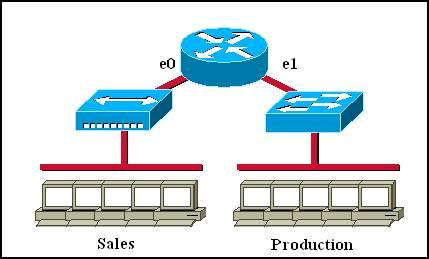
Which of the following statements describe the network shown in the graphic? (Choose two)
collision_domain_broadcast_domain.jpg
A. There are two broadcast domains in the network.
B. There are four broadcast domains in the network.
C. There are six broadcast domains in the network.
D. There are four collision domains in the network.
E. There are five collision domains in the network.
F. There are seven collision domains in the network.

Answer: A F
Explanation
Only router can break up broadcast domains so in the exhibit there are 2 broadcast domains: from e0 interface to the left is a broadcast domain and from e1 interface to the right is another broadcast domain -> A is correct.
Both router and switch can break up collision domains so there is only 1 collision domain on the left of the router (because hub doesn’t break up collision domain) and there are 6 collision domains on the right of the router (1 collision domain from e1 interface to the switch + 5 collision domains for 5 PCs in Production) -> F is correct.
Question 3
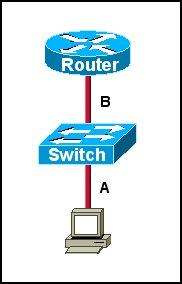
Refer to the exhibit. The two connected ports on the switch are not turning orange or green. What would be the most effective steps to troubleshoot this physical layer problem? (Choose three)
troubleshoot_physical_layer.jpg
A. Ensure that the Ethernet encapsulations match on the interconnected router and switch ports.
B. Ensure that cables A and B are straight-through cables.
C. Ensure cable A is plugged into a trunk port.
D. Ensure the switch has power.
E. Reboot all of the devices.
F. Reseat all cables.

Answer: B D F
Explanation
The ports on the switch are not up indicating it is a layer 1 (physical) problem so we should check cable type, power and how they are plugged in.
Question 4
For what two purposes does the Ethernet protocol use physical addresses? (Choose two)
A. to uniquely identify devices at Layer 2
B. to allow communication with devices on a different network
C. to differentiate a Layer 2 frame from a Layer 3 packet
D. to establish a priority system to determine which device gets to transmit first
E. to allow communication between different devices on the same network
F. to allow detection of a remote device when its physical address is unknown

Answer: A E
Explanation
Physical addresses or MAC addresses are used to identify devices at layer 2 -> A is correct.
MAC addresses are only used to communicate on the same network. To communicate on different network we have to use Layer 3 addresses (IP addresses) -> B is not correct; E is correct.
Layer 2 frame and Layer 3 packet can be recognized via headers. Layer 3 packet also contains physical address -> C is not correct.
On Ethernet, each frame has the same priority to transmit by default -> D is not correct.
All devices need a physical address to identify itself. If not, they can not communicate -> F is not correct.
Question 5
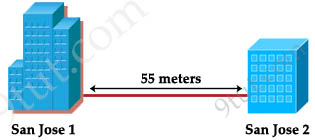
Refer to the exhibit. Two buildings on the San Jose campus of a small company must be connected to use Ethernet with a bandwidth of at least 100 Mbps. The company is concerned about possible problems from voltage potential difference between the two buildings. Which media type should be used for the connection?
Fiber-optic.jpg

A. UTP cable
B. STP cable
C. Coaxial cable
D. Fiber optic cable

Answer: D
Explanation
Because the company has problem about voltage potential difference between the two buildings so they should connect via fiber optic cable which uses light pulses to transmit information instead of using electronic pulses.
Question 6
Which command can be used from a PC to verify the connectivity between host that connect through path?
A. tracert address
B. ping address
C. arp address
D. traceroute address

Answer: A
Explanation
To check the connectivity between a host and a destination (through some networks) we can use both “tracert” and “ping” commands. But the difference between these 2 commands is the “tracert” command can display a list of near-side router interfaces in the path between the source and the destination. Therefore the best answer in this case is A – tracert address.
Note: “traceroute” command has the same function of the “tracert” command but it is used on Cisco routers only, not on a PC.
Question 7
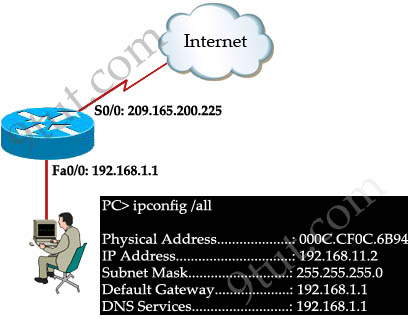
Refer to the exhibit. A network engineer is troubleshooting an internet connectivity problem on the computer. What causing the problem?
ping_unreachable.jpg
A. wrong DNS server
B. wrong default gateway
C. incorrect IP address
D. incorrect subnet mask

Answer: C
Explanation
The IP address of the PC (192.168.11.2/24) is not on the same network with its gateway 192.168.1.1 -> C is correct.
Question 8
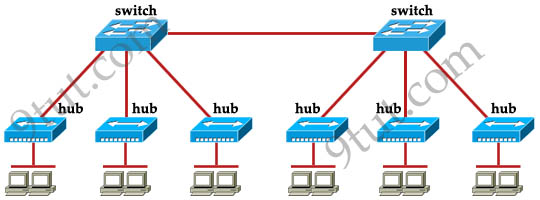
How many broadcast domains are shown in the graphic assuming only the default vlan is configured on the switches?
broadcast_domains.jpg
A. one
B. six
C. twelve
D. two

Answer: A
Explanation
Only router can break up broadcast domains but in this exhibit no router is used so there is only 1 broadcast domain.
For your information, there are 7 collision domains in this exhibit (6 collision domains between hubs & switches + 1 collision between the two switches).
Question 9
Refer to the exhibit.
PC> tracert 10.16.176.23
Tracing route to 10.16.176.23 over a maximum of 30 hops
1 31 ms 31 ms 32ms 172.16.182.1
2 62 ms 62 ms 62 ms 192.1681.6
3 93 ms 92 ms 34 ms 192.168.1.10
4 125 ms 110ms 125ms 10.16.176.23
Trace complete.
Host A has tested connectivity to a remote network. What is the default gateway for host A?
A. 172.16.182.1
B. 192.168.1.1
C. 10.16.176.1
D. 192.168.1.6

Answer: A
Explanation
It will list all the routers (from nearest to farthest) it passes through until it reaches its destination so the first hop is its nearest IP. If we ping from a PC, it is also the default gateway for that PC -> A is correct.
Question 10
What functions do routers perform in a network? (Choose two)
A. packet switching
B. access layer security
C. path selection
D. VLAN membership assignment
E. bridging between LAN segments
F. microsegmentation of broadcast domains

Answer: A C

CCNA – Basic Questions


Question 1
For which type of connection should a straight-through cable be used?
A. switch to switch
B. switch to hub
C. switch to router
D. hub to hub
E. router to PC

Answer: C
Explanation
To specify when we use crossover cable or straight-through cable, we should remember:
Group 1: Router, Host, Server
Group 2: Hub, Switch
One device in group 1 + One device in group 2: use straight-through cable
Two devices in the same group: use crossover cable
In this case we can use straight-through cable to connect a switch to a router -> C is correct.
Question 2
Which type of cable is used to connect the COM port of a host to the COM port of a router or switch?
A. crossover
B. straight-through
C. rolled
D. shielded twisted-pair

Answer: C
Explanation
The correct question should be “Which type of cable is used to connect the COM port of a host to the CONSOLE port of a router or switch?” and the correct answer is rollover cable. But we can’t plug this rollover cable directly into our host because it will not work. We often use a RJ45 to DB9 Female cable converter as shown below:
Question 3
What is the first 24 bits in a MAC address called?
A. NIC
B. BIA
C. OUI
D. VAI

Answer: C
Explanation
Organizational Unique Identifier (OUI) is the first 24 bits of a MAC address for a network device, which indicates the specific vendor for that device as assigned by the Institute of Electrical and Electronics Engineers, Incorporated (IEEE). This identifier uniquely identifies a vendor, manufacturer, or an organization.
Question 4
In an Ethernet network, under what two scenarios can devices transmit? (Choose two)
A. when they receive a special token
B. when there is a carrier
C. when they detect no other devices are sending
D. when the medium is idle
E. when the server grants access

Answer: C D
Explanation
Ethernet network is a shared environment so all devices have the right to access to the medium. If more than one device transmits simultaneously, the signals collide and can not reach the destination.
If a device detects another device is sending, it will wait for a specified amount of time before attempting to transmit.
When there is no traffic detected, a device will transmit its message. While this transmission is occurring, the device continues to listen for traffic or collisions on the LAN. After the message is sent, the device returns to its default listening mode.
So we can see C and D are the correct answers. But in fact “answer C – when they detect no other devices are sending” and “when the medium is idle” are nearly the same.
Question 5
Which two benefits are provided by using a hierarchical addressing network addressing scheme? (Choose two)
A. reduces routing table entries
B. auto-negotiation of media rates
C. efficient utilization of MAC addresses
D. dedicated communications between devices
E. ease of management and troubleshooting

Answer: A E
Question 6
When a host transmits data across a network to another host, which process does the data go through?
A. standardization
B. conversion
C. encapsulation
D. synchronization

Answer: C
Explanation
To transmit to another host, a host must go through the TCP/IP model (very similar to the OSI model). At each layer, the message is encapsulated with that layer’s header (and trailer if it has). This process is called encapsulation.
Question 7
Which two Ethernet fiber-optic modes support distances of greater than 550 meters?
A. 1000BASE-CX
B. 100BASE-FX
C. 1000BASE-LX
D. 1000BASE-SX
E. 1000BASE-ZX

Answer: C E
Explanation
Below lists the cabling standards mentioned above
StandardCablingMaximum length
1000BASE-CXTwinaxial cabling25 meters
100BASE-FXTwo strands, multimode400 m
1000BASE-LXLong-wavelength laser, MM or
SM fiber
10 km (SM)
3 km (MM)
1000BASE-SXShort-wavelength laser, MM fiber220 m with 62.5-micron fiber; 550 m
with 50-micron fiber
1000BASE-ZXExtended wavelength, SM fiber100 km
Note:
+ MM: Multimode
+ SM: Single-mode
Question 8
Refer to the exhibit. What type of connection would be supported by the cable diagram shown?
PinColorFunctionPinColorFunction
1White/GreenTX+1White/GreenTX+
2GreenTX-2GreenTX-
3White/OrangeRX+3White/OrangeRX+
6OrangeRX-6OrangeRX-
A. PC to router
B. PC to switch
C. server to router
D. router to router

Answer: B
Explanation
From the “Pin” and “Color” in the exhibit we know that this is a straight-through cable so it can be used to connect PC to switch.
Question 9
Refer to the exhibit. What type of connection would be supported by the cable diagram shown?
PinColorFunctionPinColorFunction
1White/GreenTX+3White/GreenRX+
2GreenTX-6GreenRX-
3White/OrangeRX+1White/OrangeTX+
6OrangeRX-2OrangeTX-
A. PC to router
B. PC to switch
C. server to switch
D. switch to router

Answer: A
Explanation
This is a crossover cable so it can be used to connect PC and router.
Question 10
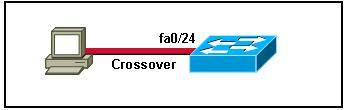
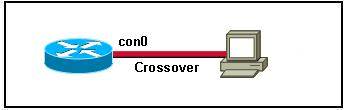
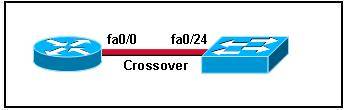
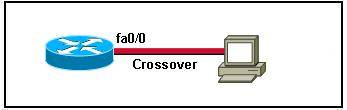
Which two topologies are using the correct type of twisted-pair cables? (Choose two)
A. connection_pc_switch.jpg
B. connection_router_pc.jpg
C. connection_switch_router.jpg
D. connection_switch_pc.jpg
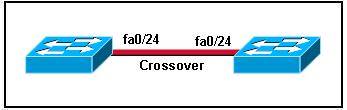
E. connection_switch_switch.jpg

Answer: D E